


Initial Tasks
These are the tasks you'll need to perform to get started with WinCVS:
- Download WinCVS
- Install WinCVS
- Start WinCVS
- Setting your preferences via Admin/Preferences
- Checking out a copy of a project
Download WinCVS
You can download the latest version of WinCVS from it's Internet home, wincvs.org.
Install WinCVS
The installation instructions should be available from wincvs.org, and will not be repeated here (otherwise this doc will get out of date too easily).
Start WinCVS
Starting WinCVS is as easy as double-clicking an icon, or selecting it from the Start Menu.
Setting your preferences via Admin/Preferences
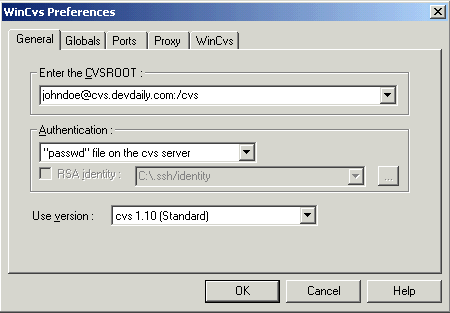
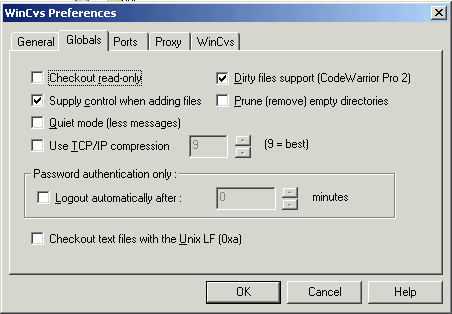
The following WinCVS screenshots give an idea of the important parameters for your preferences. The CVSROOT and Authentication methods are going to be specific to your server setup.
One important thing I've found is that you generally don't want to have the "Checkout read-only" or the "Prune empty directories" checkboxes selected. The first option really does check out the files read-only, so you can't easily modify them on your own filesystem. The second option, if selected, will keep you from seeing empty directories that actually exist in the repository. Personally I want to know about those.
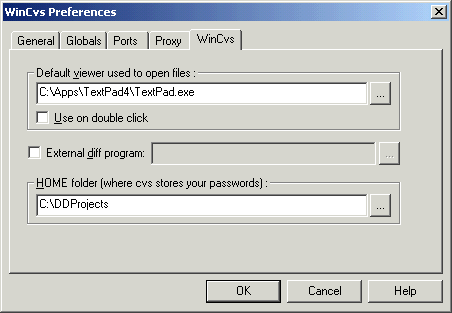
In the WinCVS tab, I prefer TextPad for editing most files, so I make that my default viewer. I also put all of my CVS DevDaily projects in a directory separate from all of my other work files. This is more of a prefence than a requirement.
That's really all you need to do for your preferences.
books by alvin
 |
 |
 |
 |
